 VGNCloud

WordPress hosting plans
The list price is also the renewal price. A discount code, if one is running, applies to the first month. After that you pay the price you saw on this page, not a higher one. If we change the price list, we give at least 30 days' notice.
Hello World
- 5 GB NVMe storage
- 1 Databases
- Unlimited Bandwidth
- Unlimited FTP users
- Free SSL
- One-click WordPress
The Debugger
- 20 GB NVMe storage
- 25 Databases
- Unlimited Bandwidth
- Unlimited FTP users
- Free SSL
- One-click WordPress
The Gigahertz
- 60 GB NVMe storage
- 50 Databases
- Unlimited Bandwidth
- Unlimited FTP users
- Free SSL
- One-click WordPress
We do not meter your traffic and we do not bill overage. Shared hosting means a site that degrades the server for everyone else can be limited.
Which WordPress hosting plan fits
Every WordPress install needs its own MySQL database. The database count, not disk space, is the real limit on how many sites a plan holds, and it is a hard limit, not a fair-use one.
Hello World: one site
One database means exactly one WordPress install. One blog, one association site, one company brochure site. Not one site plus a test copy.
The Debugger: several sites
25 databases at €4 is the first plan that holds more than one project: a production site and a test copy side by side, or a handful of client sites in one account.
The Gigahertz: a shop, or many sites
60 GB and 50 databases covers a WooCommerce shop or dozens of smaller sites. We do not sell a separate "WooCommerce-optimised" plan. It is the same shared WordPress hosting.
Where the disk actually goes
WordPress itself is about 100 MB. The media library is what fills a plan: a few hundred full-size product photos will use up 5 GB faster than you expect. If your site is image-heavy, size up on storage rather than on visitor numbers.
How to install WordPress on this hosting
Installing WordPress on this hosting is one click in the Enhance panel. You do not need FTP or phpMyAdmin for the first site.
-
1
Order a WordPress hosting plan. Hello World is enough for one site. After payment, the account and panel open.
-
2
Open the Enhance panel from your VGNCloud account. Create the site and pick a domain or a temporary address.
-
3
Install WordPress in one click. The panel creates the database and writes the files. You get admin credentials immediately.
-
4
Point the domain here. If the name already lives elsewhere, change the A record. SSL is issued once the name resolves to us. If the site already exists, the migration steps are below.
Who updates WordPress on these plans
On these shared plans, you do. WordPress installs in one click from the Enhance panel. After that, core, theme and plugin updates are yours to run, the same as on any standard shared hosting.
WordPress can automate most of it by itself: core security releases from Settings → Updates, and per-plugin auto-updates from the Plugins screen. For a small site that is genuinely enough, and it costs nothing.
What we do not do on a €2 plan is take responsibility for it. We do not test your updates before they run, we do not check the site afterwards, and we do not fix a plugin update that breaks your layout.
If you want a person accountable for updates, that is a different product: VGNCloud Managed from €60/month, which includes WordPress, theme and plugin updates, a security review and agreed work hours. We would rather say that here than let you discover it later.
WordPress server or web hosting
A "WordPress server" usually means your own VPS. This page is shared WordPress hosting: a panel, a database and a one-click install, not root. If you need root or your own stack, see the VPS page and WordPress on a VPS vs web hosting. A typical site belongs on web hosting.
Moving an existing WordPress site here
Every host advertises free migration. Almost none publishes the procedure. Here it is, including the two steps people skip and the one that breaks their email.
-
1
Lower your DNS TTL first. Set the A record TTL at your current DNS host to 300 seconds and wait for the old TTL to expire. If it is currently 24 hours, do this a day ahead. This one step decides whether the cutover takes five minutes or a day.
-
2
Take a full copy while the old site is still live: all files including
wp-content, plus a database export. -
3
Build the site here before anything switches. Create the site in the Enhance panel, upload the files through the file manager, import the database in phpMyAdmin, and point
wp-config.phpat the new database credentials. -
4
Test before DNS moves by editing your local hosts file to resolve the domain to the new server. You see the new site; the world still sees the old one. Check the front page, one post, the admin login, and any form or checkout.
-
5
Then switch DNS. With a 300-second TTL most visitors move within five minutes. Leave the old hosting running for at least 48 hours.
-
6
SSL is issued once the domain resolves here, so expect a short gap between DNS moving and the certificate going live.
-
7
The part people forget: email. If your mail runs on your current host, moving the domain's DNS can take your mailboxes with it. Check and copy your MX records before step 5. Losing a website for ten minutes is annoying; losing mail is a real problem. Before you move DNS, ask our support whether mailboxes are included on your plan. Do not assume either way.
If you get stuck, open a ticket and we will help with the migration. We do not have an automated importer and we are not going to pretend otherwise. This is a person looking at your specific site, during published support hours.
The control panel is Enhance, not cPanel
Most Finnish hosts run cPanel or Plesk. We run Enhance. Everything you use cPanel for is there: browser file manager, MySQL through phpMyAdmin, FTP accounts, one-click WordPress. The layout is different and the interface is less dated. You reach it with one click from your VGNCloud account; there is no second password to keep. Budget a little time to find where things moved if you are coming from cPanel.
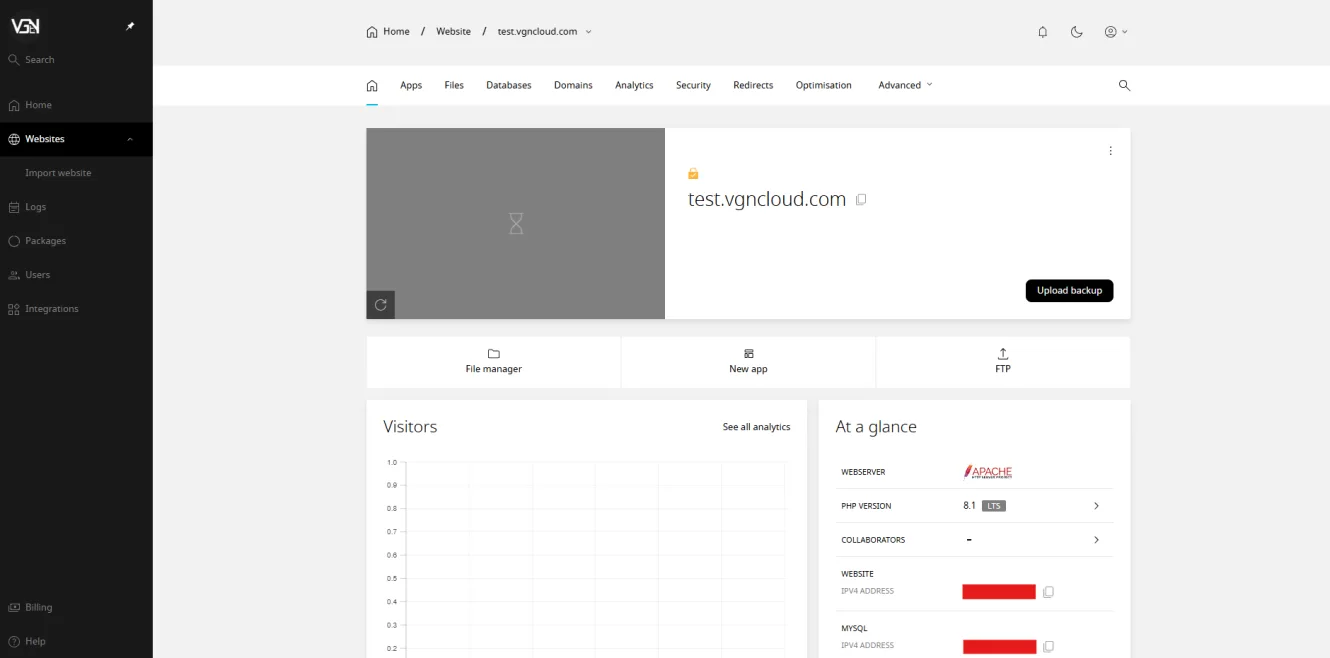
Where your data is
Your site and its database are hosted in the European Union, inside GDPR jurisdiction. No third-country transfer to document. Billing in euros.
Support and uptime
You can open a ticket at any hour. It is answered during our published support hours, which are shown live on the support page, by the same small team that runs the servers. We do not claim to be at a desk around the clock.
Our SLA guarantees 99.0% availability per calendar month, with service credits if we miss it. The targets, the credit amounts, the claim window and the exclusions are all in the SLA.
Guides